MeasureCamp Copenhagen – networking, insights and fun!

Due to this text being way too long for LinkedIn, I post it here instead and try to squeeze it down to one third for LinkedIn. All those in favor of more space for yout thoughts on LinkedIn, raise your hand!

Yesterday was just as fantastic a day as I presumed! I attended both some awesome sessions and met interesting people in between, during the breaks. 

As I ran a session myself on using R as a tool for data wrangling (thank you Jakob Styrup Brodersen for the kind words) I only had time to attend six sessions myself. All of them brilliant! And as always, it is so hard to choose… I missed out on many of the sessions I had wished so attend, like my colleague Mikko Piippo’s session on minimising analytics, Gunnar Griese’s session on how to sleep well at night whilst ensuring the data quality of GA4 and Jonas Velander’s session on improving customer journeys, just to mention a few.

The first thing I did on arrival, though, was securing my own PiwikPro hoodie! They are hot stuff in the MeasureCamp community and finally I had the opportunity to get one. And I’m currently travelling home to Helsinki via train and ferry wearing it. A bit tired, but very happy! And the hoodie is very comfy on a bit of a chilly and rainy day.

Before the sessions started Jomar Reyes and Steen Rasmussen gave the tradidional introductory speech about what an unconference is. Putting their local flavour on things of course. As the event takes place in Denmark, the main price raffled out amongst the attendants was of course a Lego set. But not just any Lego set. It was the recently released set for Sauron’s tower! The happy recipient at the end of the day was Chris Beardsly. The rest of us were left envious, with no giant Lego set to try to get home somehow. The Lego set would have been just perfect for us at Hopkins since we like to complete jigsaw puzzles together, and this would have been such a nice thing to bring home to our office to complete as the next puzzle. But we are, of course, happy on the behalf of Chris.

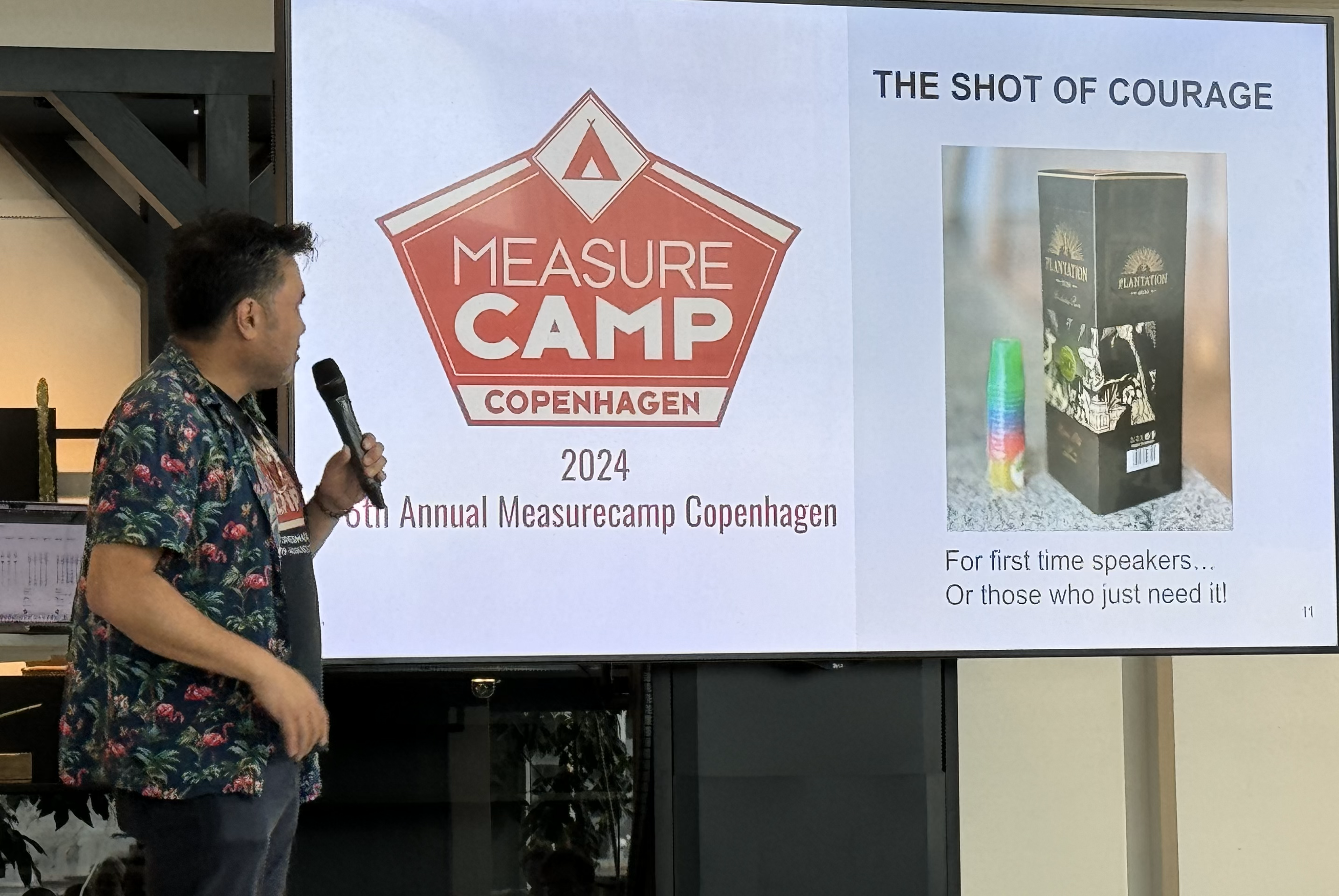
Another local flavour (pun not intended) was the Shot of Courage. For those with stage fright, or otherwise in need, there was a bottle of rum available. And some small shot glasses. Only in Denmark…
So, then to the sessions. In chronological order:

First out was BrianClifton talking about the importance of keeping track on what you’re tracking. Pointing out that you need to be mindful of all tracking that is happening, not only the cookies that everyone is talking about. For the people less into web technology it is important to understand that all the tracking done by a website is visible to the knowledgeable customer. Therefore it is very important to stay on top of your own websites (and apps!) and make sure that you track only the things the customer has given consent for. There are tools for this, one of them being Verified Data that we also use at Hopkins.

Second up was Johan Strand presenting they way they work at Ctrl Digital with utilising Google Analytics 4 data in BigQuery and LookerStudio. Johan showed us how they have started using DataForm as tools for ironing out the wrinkles of the out-of-the-box data model GA4 in BQ. A big shout out to Johan for sharing his observations and solutions with the community! Let’s all follow Johan’s example and help each other out, together lifting the craft of analytics to higher levels!

The last session before lunch was Marc Southwell from PiwikPro and Cookie Information who presented his insights from a set of over a thousand cookie consent forms from Norcic companies. The main take away being that you can (and should) optimise also your cookie consent rate. There are things you can do with your banner to lift the proportion of customers who accept the cookies. With the help of industry and country benchmarks you can go a long way to improve the rate. Every percent you win back is a significant amount of potential customers for the upper end of your funnel. Potential customers that you can serve better since they let you track them. So let’s get optimising! I certainly know how to put this into action with our customers! So thank you Marc!

Lunch was nice! We had an extraodinary discussion about all things health (some of it analytics related as well) with Astrid Illum, Danny Mawani Holmgaard, Malthe Karlsson and Katrine Naustdal. Working out is a very good counter activity to all the sitting one does as an analyst! And as an analyst – what do you do? Track it of course! Or go all the way as Astrid does, and programme an app that is tailored only for you! Cool!

After lunch I joined the session ran by Piotr Gruszecki from Altamedia about the tech stack for data wrangling and analysis at scale. Piotr gave a very inspiring talk not only about the tech stack but also on the importance of organising your work in an optimised way. The actual tech being subordinate to both the data pipeline and the work flow. Piotr’s message to us all in the community is to start working with raw data, pulling it from the systems and leveraging it for better analyses. “Think big – Start small – Scale Fast”. I think we, who have some more mileage already, can really contribute by encourigaing less experienced to try out things that might seem scary or difficult. Piotr did this in a very nice way – listen to him when you have the opportunity!

Next up was the very interesting and food for thought session by Martin Madsen from UNHCR. Martin told us about the challenges his organisation faces with the transition from Universal Analytics to Google Analytics 4. Having a large, global organisation (900 GA users!) relying on, and being perfectly happy with, the user interface of Universal Analytics that suddenly is forced to abandon it for GA4 is a giant challenge! I just love the approach Martin has taken: Boldly NOT done what all of us others have done, i.e. started building dashboards in Looker Studio or PowerBI, but rather make use of the internal reporting tools GA4 has to offer. He interviewed the end users, found out what they needed and found the solution that suits them best and never minded it is quite different from what “everybody else” is doing. This was such a refreshing example of how one sometimes can find a perfectly good and easier solution when daring to do something different. And most importantly; being extremly customer centric and really taking their need into account. Thank you Martin for sharing! And thank you for helping the UNHCR people do their extremely important work!

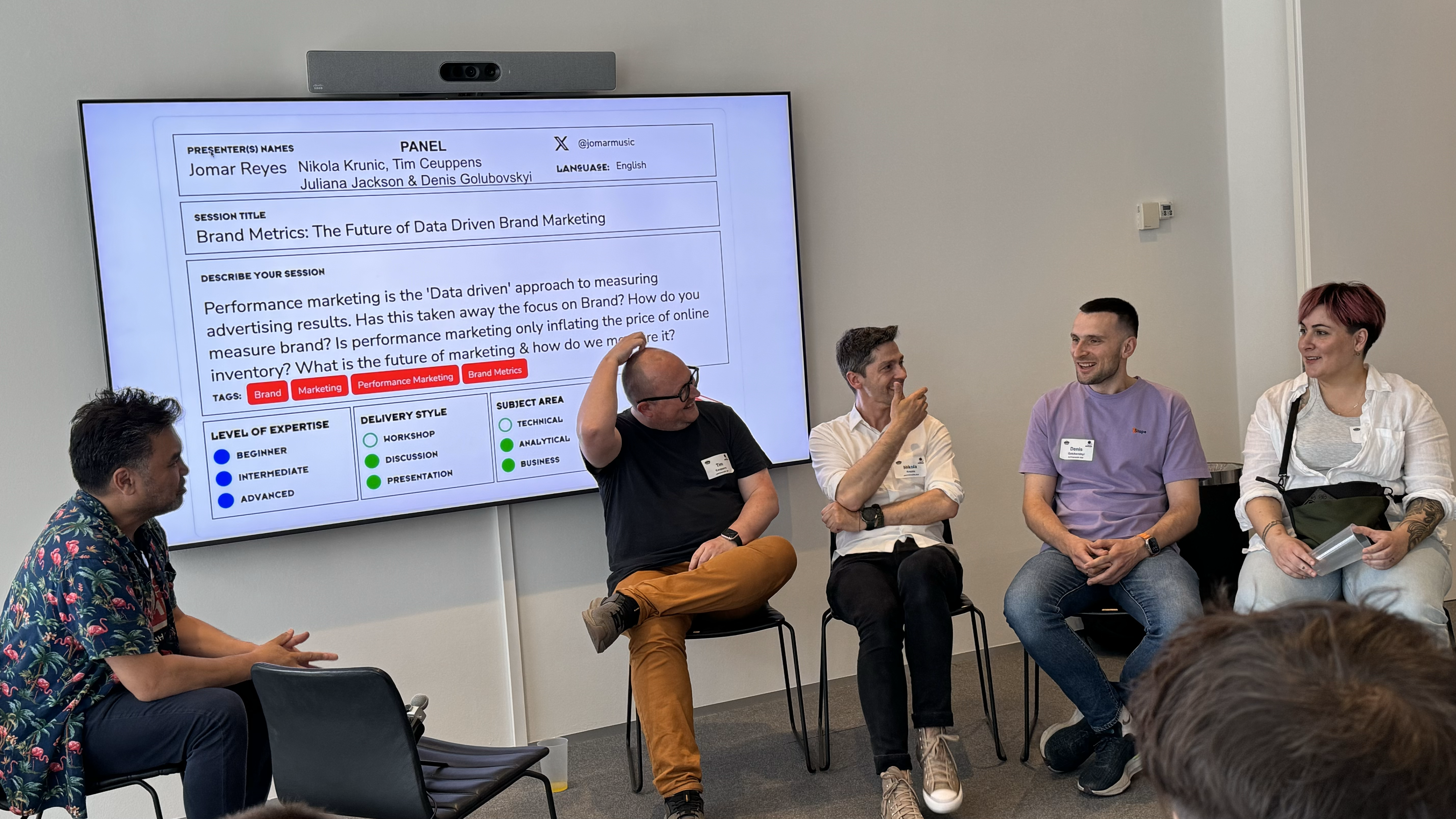
After the coffee break – when the beers were brought out, we’re in Denmark… – next up was a session doubling as a pop-up recording of an episode for the Inside brand leadership podcast. Hosted by Jomar Reyes with Tim Ceuppens, Nikola Krunic, Denis Golubovskyi and Juliana Jackson as guests. The panel discussed brand marketing in the context of digital analytics. Some very good insight were presented, so I highly encourage you to listen to the podcast when it airs! The bottom line of the discussion being, as Juliana so cleverly put it – not all marketing is advertising. And the brand marketing efforts are very hard to track, so don’t try to find them in your Google Analytics data. They are not quantitative by nature, the are qualitative. I so do agree with this. A little over a week ago, when I had the opportunity to talk to a distinguished group of marketing directors in Finland, I proposed the same conclusion. Some things are not trackable with digital analytics. For some insights you need to turn to more traditional methods such as surveys or interviews.
I ended the day with my own session on how to utilise R for data wrangling. I have done this same session last autumn in Stockholm, this spring in Helsinki and now again in Copenhagen. I have absolutely now other reason to do this but the pure joy of sharing something I am very happy with. I firmly believe that one should try to find the right tool for the right occasion and have myself harnessed R mainly for data wrangling and simpler analyses. I’ve also done some heavy lifting with it, but I seldom nowadays have the opportunity to do that. As soon as some customer needs some deeper analyses of their data though, I’ll be happy to dive in again! My session was attended by a group of persons, of whom I wish at least one would try out R and perhaps start using it. That would make me extremely happy! I was so glad to hear that Eelena Osti got inspired from my session in Helsinki and has started using R!

Cudos of course to the orgainising committe! Just mentioning some of you – Corie Tilly, Steen Rasmussen, Jomar Reyes, Juliana Jackson, Robert Børlum-Bach – but all of you should be proud of what you accomplished yesterday, it was great!

I wont even try to mention all of whom I chatted with during the day or the after party, as I am sure I’d miss some, so let’s just thank you all, and see you next time! And I wish you all more than welcome to MeasureCamp Helsinki in March 2025!

An extra special thank you though, to the sponsors enabling this MeasureCamp. These events are very important to our community and work both as knowledge sharing opportunities, network building events and recruitement opportunities. So thank you for supporting: Piwik PRO, Stape, Google, Sense8 Digital Technology , bmetric, Digital Power and Aller Media Denmark. Your help is so much appreciated!



AMR outliers or not?

I’m working on a data set with AMR for audio. AMR = Average Minute Rating, in essence how many listeners you content has had on average, each minute. You can think of it as a measure of your audience being spread out evenly over the content, from start to beginning.

To be able to calculate your AMR you need to know the total amount of minutes people have listened to your content and then of course the length of the content. So if your audio content is ten minutes long and your analytics tells you that you have a total of 43 minutes of listening, that would give you an AMR of 4.3 (=on average 4.3 persons listened to the content for the entire duration of it).

My assupmtion is, at least when it comes to well established audio content, like pods running for tens of episodes, that the AMR is more or less the same for each episode. Or at least within the same ball park.

However, at times your data might contain odd numbers. Way to small or way too big numbers. So are these outliers or should you believe that there actually was that few/many listeners at that particular time? Well, there’s no easy answer to that. You need to do some exploratory analysis and have a thorough look at your data.

First, especially if you run into this kind of data often, I would establish some kind of rule-of-thumb as to what is a normal variation in AMR in your case. For some content variation might be small, and thus even smaller deviations from the “normal” should be singled out for further analysis. In other cases the AMR varies a lot, and then you should be more tolerant.

Then, after identifying the potential outliers, you need to start playing detective. Can you find any explanation as to why the AMR is exceptionnally high or low? What date did you publish the content? Was it holidays when your audience had more time than usual to listen to the content or did some special event occur that day, that drew people away from it? Again, there is no one rule to apply, you need to judge for yourself.

Another thing to consider is the content: Was the topic especially interesting/boring? Did you have a celebrity as a guest on your pod/did you not have one (if you usually do)? Was the episode much longer/shorter than normally? Was it published within the same cycle, like day of week/month as you usually do? Did you have technical difficulties recording that affects the quality? And so on, and so son…

It all boils down to knowing your content, examining it from as many different perspectives as possible, and then make a qualified judgement as to whether or not the AMR is to be considered an outlier or not. Only then can you decide which values to filter out and which not.

When you are done with this, you can finally start the analysis of the data. As always, cleaning the data takes 80% of your time and the actual analysis 20% – or was it 90%-10…?


P.S. Sometimes it helps to visualise – but not always:

Failed linegraph of AMRs
Epic fail: Trying to plot a line graph of my AMRs using ggplot2. Well, it didn’t turn out quite as expected 😀


Funny vizzes

Every now and then your visualisation tool might be a little too clever. And it suggests some nice viz based on your data but the viz makes absolutely no sence. Like the one below. The credits go to Google Sheets this time. I had a simple dataset, just two columns of simple integers that I wanted to plot in a line chart. Actually, I’ve plotted seven of them already today. But come number eight, Google Sheets decides it is not an appriopriate viz anymore. So it drew this for me:

Not much information in that one 😀 Perhaps this was Googles way of telling me to take a break?

I just thought I’d share it with you since we all need a good laugh every now and then! And I just might share some other funny vizzes as they come along. Please comment and share your similar vizzes, I’m sure you have a bunch of them as well!

Switching your Tableau accounts

As much as I love Tableau, their website(s) can be a bit confusing at times. Surfing around on them feels that you’re required to log in multiple times during one session. This is of course due to the site actually being many sites and you can have multiple identities on them, which might make things a little confusing…

As I’m about to change employer I wanted to make sure that my Tableau identity follows me along. Not that I have that much content on the Tableau site(s), but still. So I set about changing the emails.

The one’s I’m interested in “keeping” are the account on Tableau Community and the one on Tableau Public.

First, the Tableau Public account: Login to Tableu Public (note that you might have a separate password for this one, as they are NOT the same accounts!) and make the changes in the settings section. Again, you’ll need to verify the email via a confirmation email.

Then, the Tableau Community account: Log in – no, SIGN in, on the page http://www.tableau.com and make the necessary changes in the the “Edit account” menu. Make sure to verify the email via the confirmation email sent to the updates email address. You can find the instructions here.

So far so good. Except for the fact that changing your email on the community account also affects the account you have on your customer portal :/ So currently I can access my company account logging in with my private email… And apparently, if your customer portal account is deleted, so is your community account! This behaviour/dilemma doesn’t really seem to be recognised by Tableau. I’ve been in contact with both their Tech Support and their Customer Service, but neither has yet been able to help me. Let’s hope this can be resolved, as I am sure I am not the only one who wants to keep the community identity when changing employer.
The coolest thing about data

Perhaps the really really coolest thing about data is when it starts talking to you. Well, not literally, but as a figure of speech. When you’ve been working on a set of raw data, spent hours cleaning it, twisting it around and getting to know it. Tried some things, not found anything, tried something else. And then suddenly it’s there. The story the data wants to tell. It’s fascinating and I know that I, at least, can get very excited about unraveling the secrets of the data at hand.

And it really doesn’t need to be that much analysis behind it either, sometimes it’s just plain simple data that you haven’t looked at like that before. Like this past week when we’ve had both the icehockey world championships and the Eurovision Song Contest going on. Both of them events that are covered by our newspaper and both of them with potential to attract lots of readers. Which they have done. But the thing that has surprised me this week is how different the two audiences behave. Where the ESC-fans find our articles on social media and end up on our site mainly via Facebook, the hockey fans come directly to our site. This is very interesting and definitely needs to be looked into more in depth. It raises a million questions, the first and foremost: How have I not seen this before? Is this the normal behaviour of these two groups of readers? Why do they behave like this? And how can we leverage on this information?

Most of the times, however, the exciting feeling of a discovery and of data really talking to you, happens when you have a more complex analysis at hand. When you really start seeing patterns emerge from the data and feel the connection between the data and your daily business activities.  I’m currently working on a bigger analysis of our online readers that I’m sure will reveal it’s inner self  given some more time. Already I’ve found some interesting things, like a large group of people never visiting the front page. And by never, I really do mean never, not “a few times” or “seldom”, I truly mean never. But more on that later, after I finish with the analysis. (I know, I too hate these teasers – I’m sorry.)

I hope your data is speaking to you too, because that really is the coolest thing! :nerd_face:

Be careful when copying Supermetrics files!

Even though Supermetrics is a very easy to use tool, I every now and then run into trouble using it. Admittedly, this probably should be attributed to my way of working rather than to the software itself 😉

Just last week I noticed that a couple of my reports weren’t emailing as scheduled. I couldn’t figure out what was wrong as everything looked allright, except for the emailing. So I filed a ticket and got help in just a few hours (Thank you Supermetrics for the fast response!) and got the emailing working again.

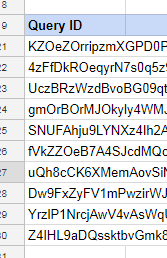
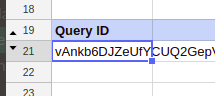
The thing was that I had the same QueryID for two different queries on different Google Sheets. As one had refreshed and emailed, the other could not do that any more as we use Supermetrics Pro and not Super Pro. Or, actually, it did refresh but it didn’t email. And having the same trigger time for both reports, according to Supermetrics’ support “… it may be random everyday which one actually sends, depending on who gets in the processing queue first.”

Luckily the fix is easy, just delete the QueryID on the sheet called SupermetricsQueries and refresh the query manually. A new QueryID is assigned to your query and you’re good to go.

Screenshot from 2018-04-15 16-17-55

So, how did I end up with the same QueryID on two reports? Easy. I had copied the entire report using the Make a copy -option in the File-menu. Which, in hindsight, obviously also copies the QueryID. But this I didn’t think about at the time. Actually, I’m quite surprised this hasn’t happened to me before.

So my advice to you is twofold: Mind your QueryID’s when copying queries and/or files. And if you have many reports to jiggle (I have approx. 200 automated reports, some of them with multiple queries) it might be worth considering to keep track of the QueryID’s.

I decided to add the QueryID:s to my masterlog of all reports I maintain. And then did add a conditional formatting rule to the area where I store the QueryID:s. This way I’ll automatically be alerted about duplicate QueryID:s across my reports.


Configuration error in Data Studio

Suddenly, one day, several of the dashboards I had created in Data Studio crashed. They only showed a grey are with the not so encouraging information about a configuration error:

config_error1

Normally I encounter this when the google account I use for creating the dashboard has been logged out for some reason. But this was not the case this time. So I followed the instructions…

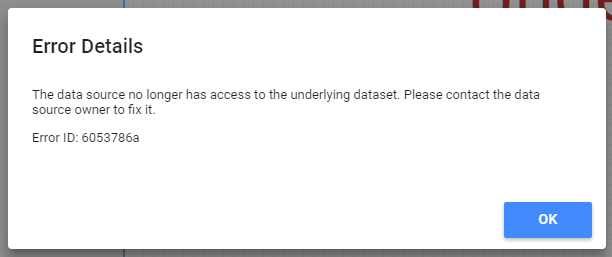
Clicking on See Details the told me that the problem had something to do with the connection to the data. Alas, contacting the data source owner would not be of any help as the data source owner happens to be yours truly, and I was sure that I hadn’t made any changes to the data source.

config_error2

At this point I was starting to become a little bit alarmed. What could have happened to the data source?

I decided to open the data source (from the pen-like icon next to the name of the data source):

config_error3

This then in turn opened a slightly more informative, and certainly more encouraging, dialogue box:

config_error4

Interestingly enough, I had not made any changes to the data source. The data source being Google Big Query and the owner of the data being this very same account since the beginning of this setup. I cannot really imagine what had caused this hickup in the connection, but it was indeed solved by “reconnecting” to the source. First clicking reconnect in the above dialogue box and then once again in the pane that opens:

config_error5

After this you click “Finished”:

config_error6

So in the end, all dashboards are now again up and running, although it was somewhat annoying having to go through all dashboards and “reconnect” to a data source I already am the owner of.

config_error7


Analysing the wording of the NPS question

NPS (Net Promoter Score) is a popular way to measure customer satisfaction. The NPS score is supposed to correlate with growth and as such of course appeals to management teams.

The idea is simple, you ask the customer how likely he or she is to recommend your product/service to others on a scale from 0 to 10. Then you calculate the score by subtracting the sum of zeros to sixes from the sum of nines and tens. If the score is positive it is supposed to indicate growth, if it is negative it is supposed to indicate decline.

My employer is a news company publishing newspapers and sites mainly in swedish (some finnish too). Therefore we mainly use the key question in swedish, i.e. Hur sannolikt skulle du rekommendera X till dina vänner? This wording, although an exact mach to the original (How likely is it that you would recommend X to a friend?) seems a little bit clumsy in swedish. We would prefer to use a more direct wording, i.e. Skulle du rekommentera X till dina vänner? which would translate into Would you recommend X to a friend? However, we were a bit hesitant to change the wordin without solid proof that it would not affect the answers.

So we decided to test it. We randomely asked our readers either the original key question or the modified one. The total amount of answers was 1521. Then, using R and the wilcox.test() function, I analysed the answers and could conclude that there is no difference in the results whichever way we are asking the question.

There is some criticism out there about using the NPS and I catch myself wondering every now and again if people are getting too used to the scale for it to be accurate any more. Also, here in Finland there is a small risk that people mix the scale with the scale 4-10 which is commonly used in schools and therefore apply their opinions to their years old impression about what is considered good and what is considered bad. I’d very much like to see some research about it.

Nevertheless, we are nowaday happily using the shorter version of the NPS key question. And have not found any reason why not to. Perhaps it could be altered in other languages too?


The 2018 presidential election in Finland, some observations from a news analytics perspective

The presidential elections 2018 in Finland were quite lame. The incumbent president, Sauli Niinistö, was a very strong candidate from the offset and was predicted to win in the first round, which he did. You can read more about the elections for instance on Wikipedia.

Boring election or not, from an analytics perspective there is always something interesting to learn. So I dug into the data and tried to understand how the elections had played out on our site, hbl.fi (which is the largest swedish language news site in Finland).

We published a total of 275 articles about the presidential election of 2018. 15 of these were published already in 2016, but the vast majority (123) was pubslished in January 2018.

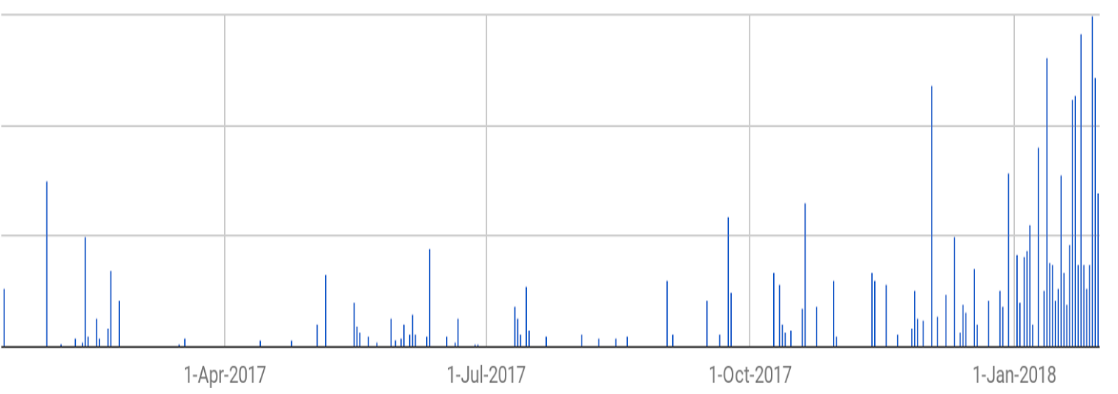
Among the readers the interest for the elections grew over time, which might not be that extraordinery (for Finnish circumstances at least). Here are the pageviews per article over time (as Google Analytics samples the data heavily i used Supermetrics to retrieve the unsampled data – filtering on a custom dimension to get only the articles about the election):

President_2018_per_day

Not much interesting going on there. So, I also took a look at the traffic coming in via social media. Twitter is big in certain circles, but not really that important a driver of traffic to our site. Facebook, on the other hand, is quite interesting.

Using Supermetrics again, and doing some manual(!) work too, I matched the Facebook post reach for a selection of our articles to the unsampled pageviews measured by Google Analytics.  From this, it is apparent that approximately one in ten persons reached on Facebook ended up reading our articles on our site. Or more, as we know that some of the social media traffic is dark.

The problem with traffic that originates from Facebook is that people tend to jump in and read one article and then jump out again. Regarding the presidential elections this was painfully clear, the average pageviews was down to 1,2 for sessions originating from Facebook. You can picture this as: Four out of five people read only the one article that was linked to Facebook and then they leave our site. One out of five person reads an additional article and then decides to leave. But nobody reads three or more articles. This is something to think about – we get a good amount of traffic on these articles from Facebook but then we are not that good at keeping the readers on board. There’s certainly room for improvement.

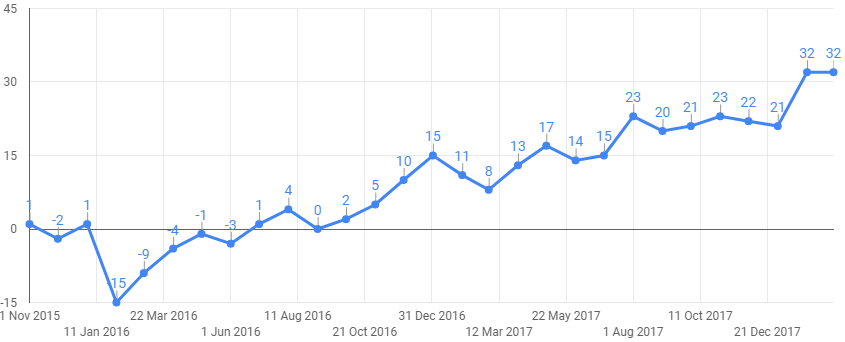
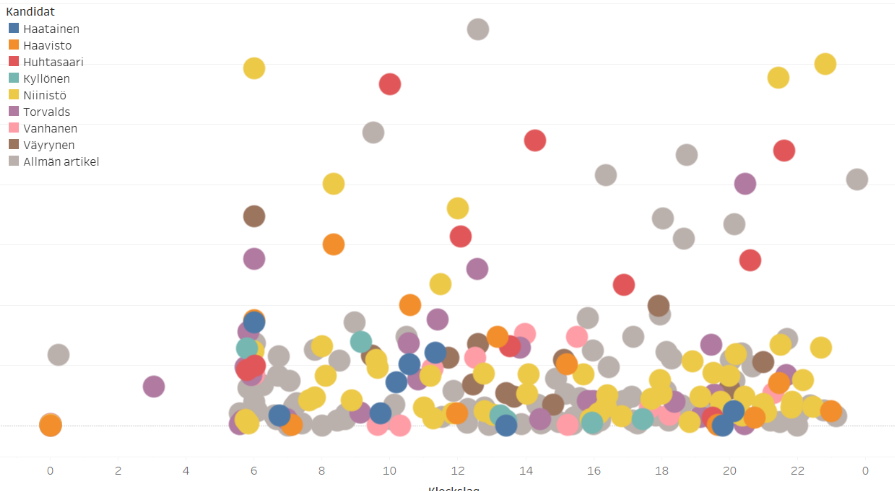
What about the content then? Which articles interested the readers? Well, with good metadata this is not that difficult an analysis. Looking at the articles split by the candidate they covered and the time of day the article was published:

President_2018_per_candidate

(The legend of the graph is in swedish => “Allmän artikel” means a general article, i.e. either it covered many candidates or it didn’t cover any candidates at all.)

Apart from telling us which candidates attracted the most pageviews, this also clearly shows how many articles were written about which candidate. A quite simple graph in itself, a scatter diagram coloured by the metadata, but revealing a lot of information. From this graph there are several take aways; at what time should we (not) publish, which candidates did our readers find interesting, should we have written more/less about one candidate or the other. When you plot these graphs for all different kinds of meta data, you get a quite interesting story to tell the editors!

So even a boring election can be interesting when you look at the data. In fact, with data, nothing is ever boring 😉


A note about the graphs: The first graph in this post was made with Google Sheets’ chart function. It was an easy to use, and good enough, solution to tell the story of the pageviews. Why use something more fancy? The second graph I drew in Tableau, as the visualisation options are so much better there than in other tools. I like using the optimal tool for the task, not overkilling easy stuff with importing it to Tableau, but also not settling for lesser quality when there is a solution using a more advanced tool. If I had the need to plot the same graphs over and over again, I would go with an R-script to decrease the need of manual clicking and pointing.


Switching Supermetrics reports to a new user – some tips and tricks

Recently I was faced with the need to switch a bunch of Supermetrics reports (in Google Sheets) to another user. How this is done is perhaps not the most obvious thing, but not at all hard after you figure it out.

This is how you do it:

  1. Open the report and navigate to the sheet called SupermetricsQueries. (If you can’t see this sheet you can make it visible either via the All sheets -button at the lower left hand corner of your Google Sheets or via the add-on menu Supermetrics / Manage queries). On this sheet you’ll find a page with some instructions and a table with  information about the queries in this report.
  2. Delete the content in the column QueryID :
    supermetrics_QueryID
  3. Replace the content in the column Refresh with user account with the correct credentials. E.g. if we talk about Google Analytics this is the email of the account you want to use, if it is Facebok it is a long numerical id.
    supermetrics_RefreshWithUserAccount
  4. Navigate to the Supermetrics add-on menu and choose Refresh all.
  5. Be sure to check the results in the column Last status to ensure that all queries were updates as planned.
    supermetrics_LastStatus
  6. Then, check the data in the reports themselves.
  7. When you’re done I suggest you hide the sheet SupermetricsQueries sheet so that you (or someone you shared the report with) doesn’t alter the specs by mistake.
  8. Don’t forget to transfer the ownership of the file itself if needed!


This is pretty straight forward. Updating a bunch of reports I, however, made the following notes-to-self that I’d like to share with you:

  • Make sure that the account you are using Supermetrics with has credentials to all the data you want to query!
  • Before you start transferring your reports take some time to get acquainted with the content of the reports. Perhaps even make a safety copy of it so that you can be sure that the new credentials and queries are producing the data you expected.
  • When updating the report you probably will want to make some changes to some of the queries. I noticed that when updating many queries it might be easier to update them making changes to the specifications in the table on the SupermetricsQueries sheet instead of using the add-on. Just be careful while doing this!
  • NB! If the original report was scheduled to auto refresh or auto email with certain intervals, you will need to re-do the scheduling. So make sure you know who the recipients of the original report were before you switch the ownership!